
Know what happens inside
Track post-install events, measure revenue per campaign, and visualize user journeys from install to conversion. A few line of code.
Start free for 3 months · Conversion tracking included free · No credit card required
import { Mobana } from '@mobana/react-native-sdk';

// Initialize once on app start
Mobana.init({ appId: 'a1b2c3d4', appKey: 'your-app-key' });

// Track signups
Mobana.trackConversion('signup');

// Track purchases with revenue
Mobana.trackConversion('purchase', 49.99);

// Track any custom event
Mobana.trackConversion('subscription', 9.99);See the full picture — from install to revenue
Funnel analysis, conversion velocity, revenue tracking, and campaign performance — all in real-time.
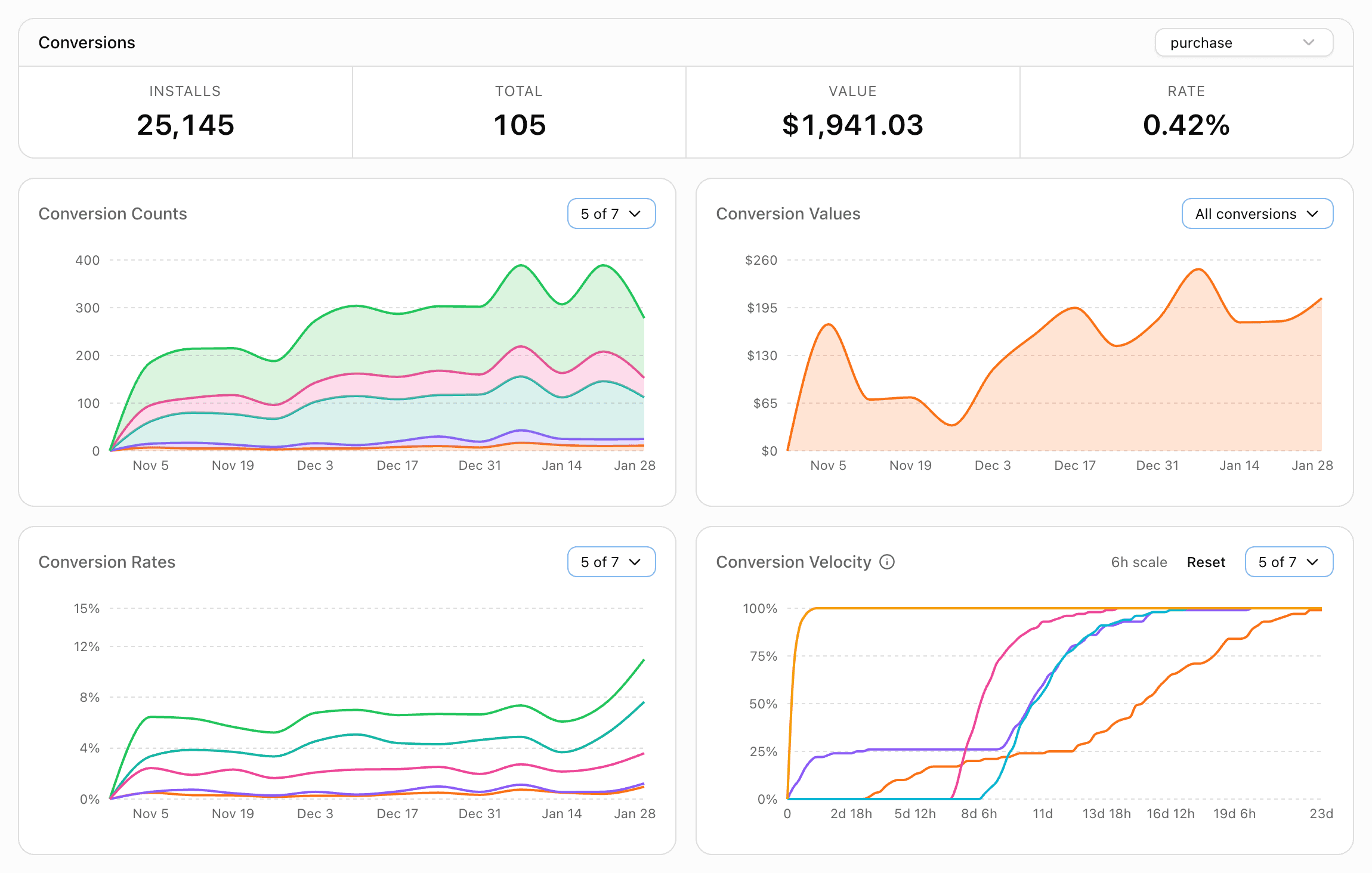
Real-time
Conversion tracking
Conversion
Rate monitoring
Revenue
Per campaign
Velocity
Time-to-conversion
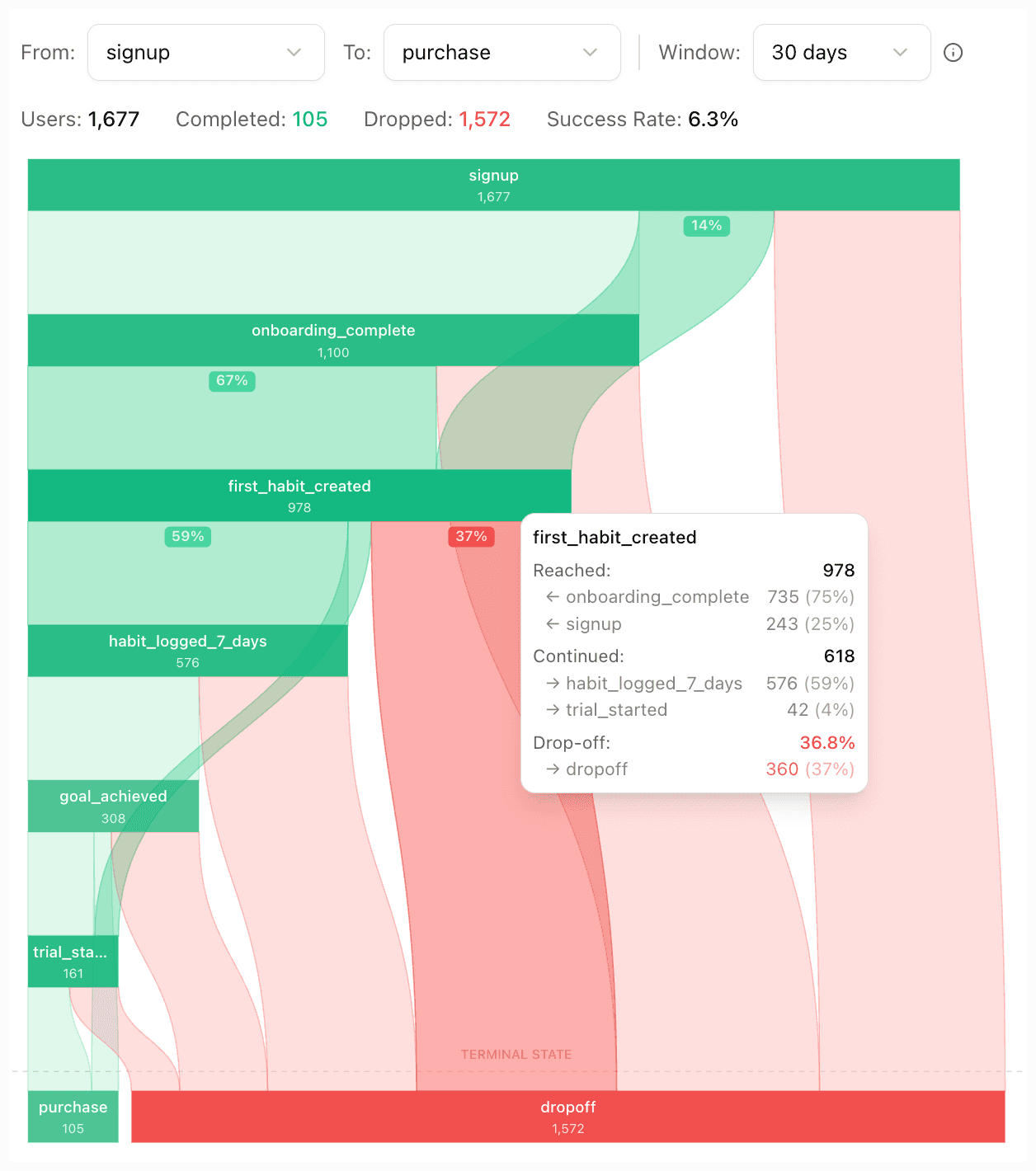
Powerful funnel analysis for complex user journeys
See exactly where users drop off and where they convert. Our funnel view visualizes each step from install to revenue, so you can spot bottlenecks, compare conversion rates between stages, and optimize the path to conversion.
- Visualize multi-step journeys in one place
- Identify drop-off points and improve conversion rates
- Compare stages and attribute revenue to each step
How it works
Two simple steps to start tracking conversions in your app
Configure conversion types
Define the events you want to track in your app settings. Signups, purchases, subscriptions, level completions — whatever matters to your business.
Track events via SDK
One line of code wherever the event happens. Optionally attach a monetary value for revenue tracking.
// Track signup
Mobana.trackConversion('signup');

// Track purchase with value
Mobana.trackConversion('purchase', 49.99);Observe funnel analytics
Watch conversion data flow in real-time. Interactive funnel diagrams visualize complex user journeys from install to conversion, highlighting every drop-off point.
Optimize based on data
Compare conversion rates across campaigns, identify where users drop off, and double down on what drives real revenue — not just installs.
Beyond install counts
See the full ROI of your campaigns. Not just clicks and installs, but revenue and retention.
Simple, transparent pricing
Pay for what you use. Across all your apps. Nothing hidden.
- 2,500 attributions
- 5,000 flow views
- 250 AI credits
- Up to 3 apps
- 30 days data access
- 2 fixed conversions
- 5,000 attributions
- 10,000 flow views
- 500 AI credits
- Up to 5 apps
- 6 months data access
- Conversion tracking
- Engagement analytics
- 20,000 attributions
- 50,000 flow views
- 2,500 AI credits
- Unlimited apps
- 12 months data access
- Flows A/B testing
- Team access
- Priority support
- 100k+ attributions/mo
- 250k+ flow views/mo
- No limits
- On-premise option
- SLA guarantee
- Dedicated manager
An attribution is a confirmed install matched to a tracked click
A flow view is a session of a dynamic flow experience
AI requests are currently used for the Flows agentic AI Builder
Quick Start
Everything you need to integrate Mobana in minutes
View full documentationSDK Quick Start
Add the React Native SDK and configure it with your app ID from the Dashboard.
npm install @mobana/react-native-sdk @react-native-async-storage/async-storageimport { Mobana } from '@mobana/react-native-sdk';
// 1. Initialize once on app start
Mobana.init({
appId: 'a1b2c3d4',
appKey: 'your-app-key',
});
// 2. Track conversions wherever events happen
Mobana.trackConversion('signup');
Mobana.trackConversion('purchase', 49.99);
Mobana.trackConversion('subscription', 9.99);Direct API Reference
Track conversion events
Track custom events after install like signups, purchases, or level completions. Configure conversion types in your app settings first.
Request
POST https://a1b2c3d4.mobana.ai/conversion
Content-Type: application/json
X-App-Key: your-app-key

{
  "installId": "520e8400c466a55440e00",
  "name": "purchase",
  "value": 49.99
}
Response
{
  "success": true
}
Request Fields
| Field | Required | Description |
|---|---|---|
| installId | Required | Unique ID for this install (UUID generated on first launch) |
| name | Required | Conversion type (must be configured in app settings) |
| value | Optional | Monetary value for revenue tracking |
Install ID: Generate a random UUID on first app launch and store it locally. Use the same ID when tracking conversions so they can be attributed to the right install. SDK handles this automatically →
Silent success pattern: This endpoint always returns success: true — invalid IDs or unconfigured conversions are silently ignored to never block your app flow. Conversion tracking is free.
Frequently asked questions
What is conversion tracking?
Conversion tracking lets you measure post-install events like signups, purchases, or subscriptions. You can attach monetary values to see actual revenue per campaign — not just install counts. Configure your conversion types in the dashboard, then call our SDK when events happen.
Does conversion tracking require attribution?
No. Conversion tracking works independently — you can track events for all users, whether attributed or organic. However, when combined with attribution, you get the full picture: which campaigns drive users who actually convert and generate revenue.
What counts as a conversion?
Any event you configure in your app settings. Common examples include signups, purchases, subscriptions, level completions, or feature activations. You define what matters to your business, and we track it.
How does funnel analysis work?
Our interactive funnel diagram visualizes complex user journeys from a starting event (like install) through to your target conversion. You can configure time windows (6 hours to 30 days) and see exactly where users drop off between steps — helping you identify friction points and optimize your conversion funnel.
Is conversion tracking billed separately?
No. Conversion tracking is included free with any plan, including the free trial. You're only billed for attributions (successful install matches) and flow views. Track as many conversions as you need at no additional cost.
Can I track revenue?
Yes. Attach a monetary value to any conversion event — trackConversion('purchase', 49.99). The dashboard shows total revenue, average value, and revenue breakdowns by campaign, source, and country.
How does the free trial work?
Conversion tracking is always free, regardless of plan. The 3-month free trial also includes 2,500 attributions and 5,000 flow views per month. No credit card required to start. When the trial ends, you can upgrade to a paid plan or your account will be paused until you subscribe.
What platforms are supported?
We currently support React Native for iOS and Android. Our SDK handles platform-specific features automatically. Native iOS and Android SDKs are on the roadmap.
Ready to measure what actually matters?
Start tracking conversions in minutes. Included free with any plan.
Get Started Free