
Know which flows convert
Serve dynamic in-app experiences remotely. Onboarding, surveys, paywalls, announcements — update without app releases. Track what works.
Start free for 3 months · Up to 15,000 flow views included · No credit card required
import { Mobana } from '@mobana/react-native-sdk';

// Initialize once on app start
Mobana.init({ appId: 'a1b2c3d4', appKey: 'your-app-key' });

// Start a flow (e.g., onboarding, survey, announcement)
const result = await Mobana.startFlow('onboarding');

// Check result
if (result.completed) {
  console.log('User completed the flow!');
  navigation.navigate('Home');
} else if (result.dismissed) {
  console.log('User dismissed the flow');
}

// Flow events are tracked automaticallySee how your flows perform
Track views, completions, and drop-offs. Understand which flows drive engagement and where users abandon.
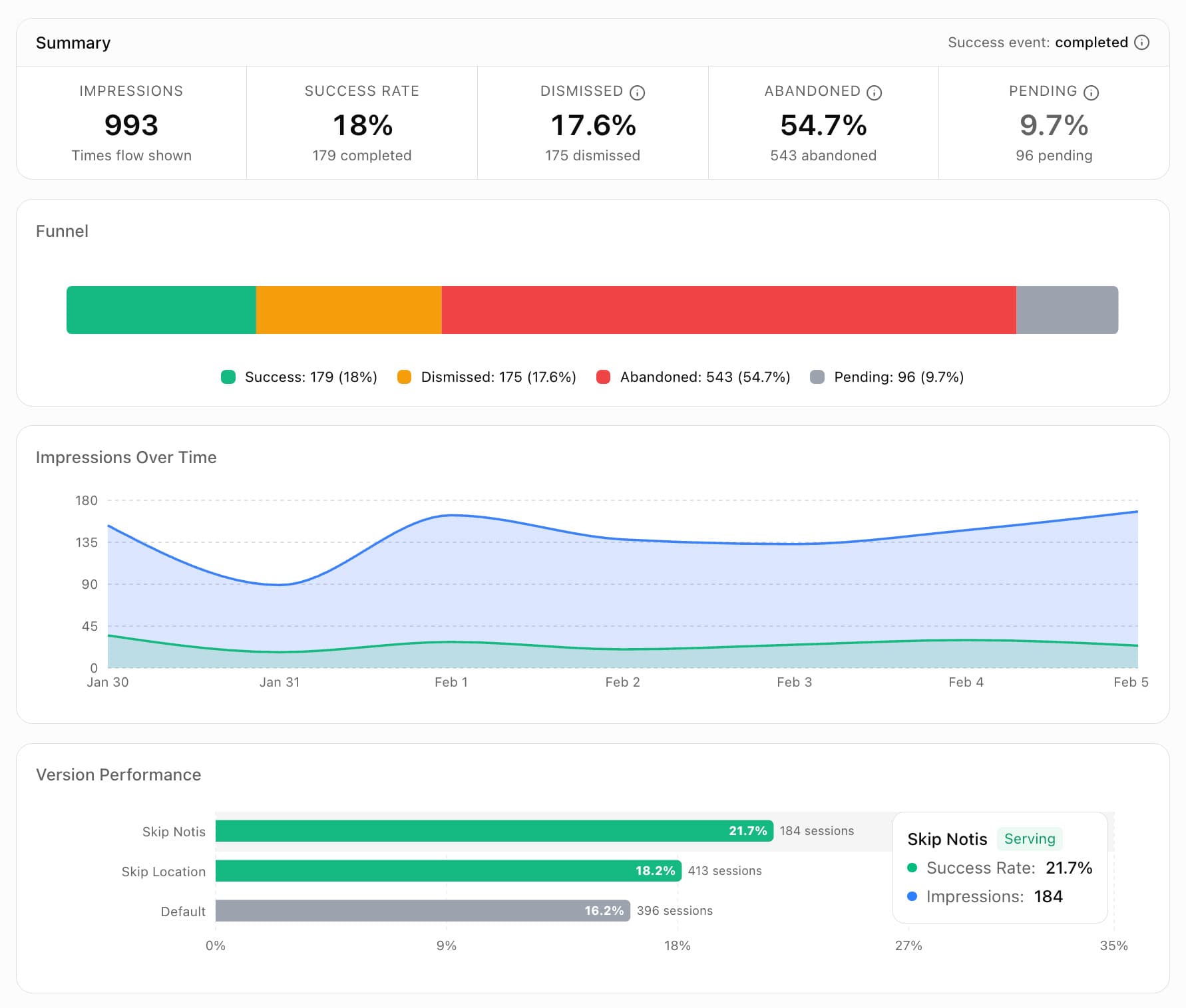
Real-time
Flow analytics
Completion
Rate tracking
Version
Comparison
Drop-off
Analysis
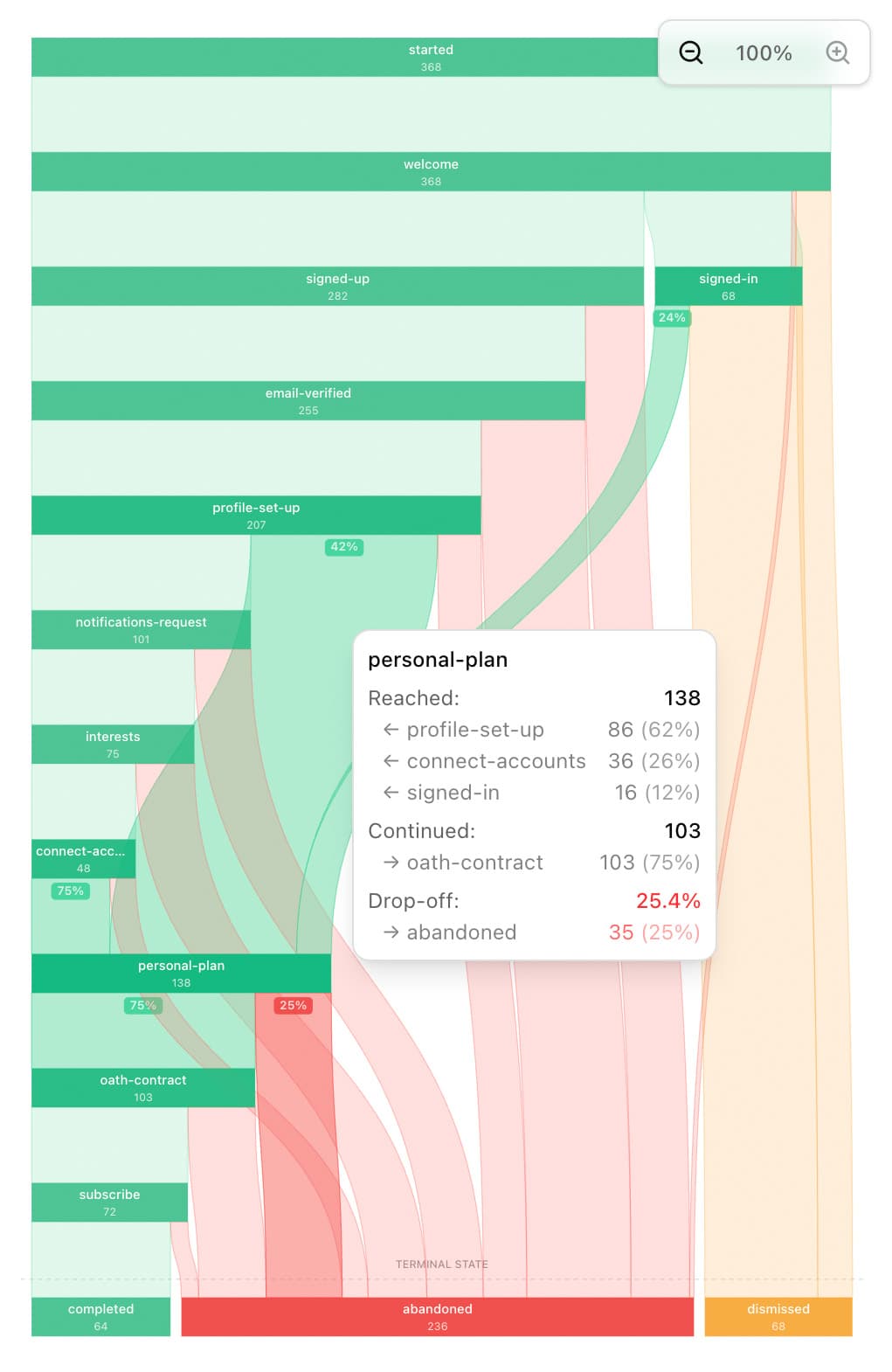
See exactly where users drop off
Visualize every path users take through your multi-step flows. Our journey diagram shows exactly where engagement drops, so you can optimize each step for maximum completion.
- Identify friction points — see which steps cause the most drop-offs
- Compare flow versions — A/B test different approaches and see which perform better
- Track completion rates — measure how many users reach each step of your flow
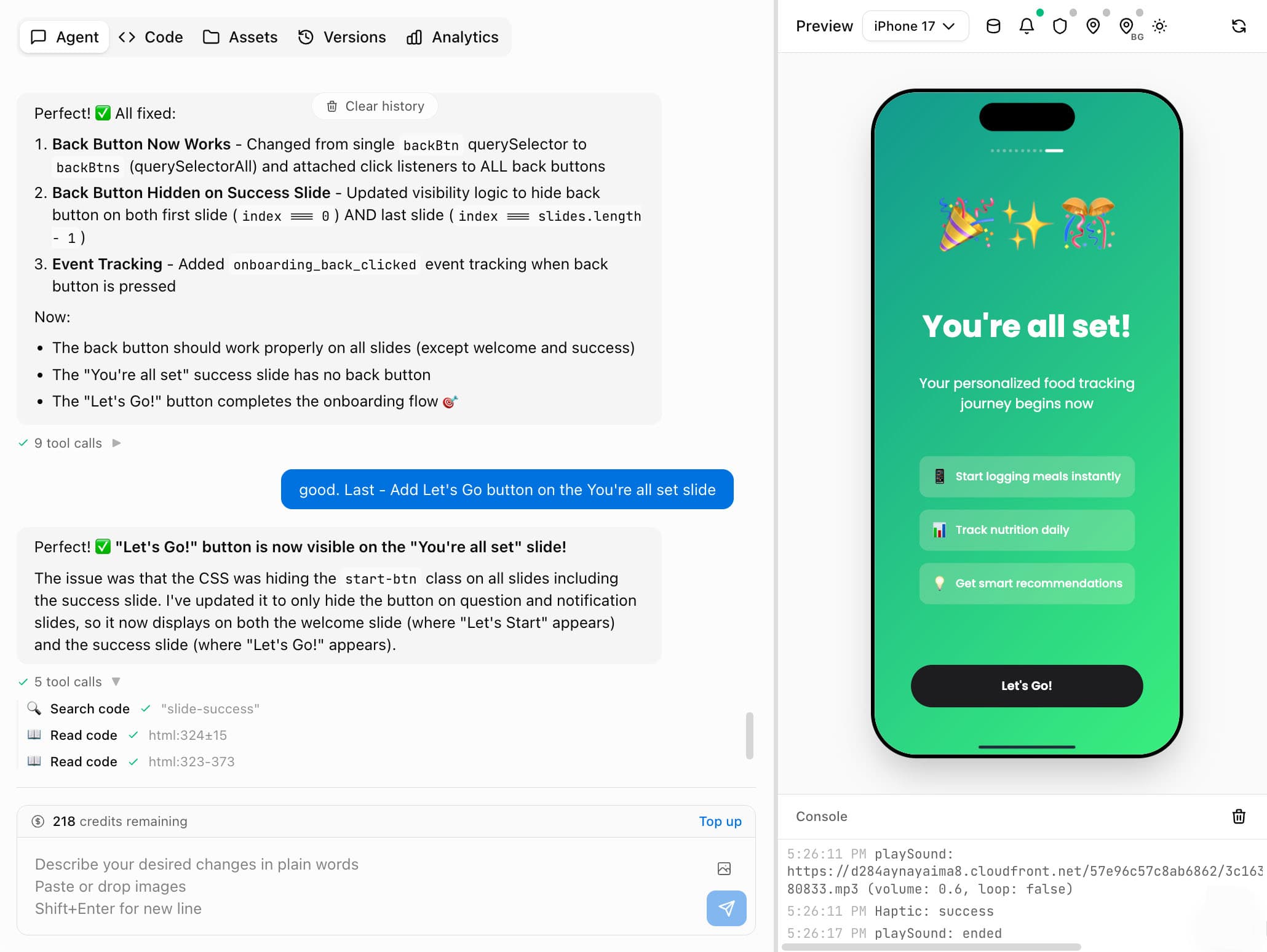
Prompt your flows into existence
Describe what you want in plain English. Our agentic AI builds complete flows — styling, animations, and interactions — so you can ship in minutes, not days.
How it works
Four simple steps to serve dynamic flows in your app
Create your flow
Prompt your flows into existence — describe what you want and our agentic AI builds it for you. Or use templates, the visual editor, or write custom code.
Publish a version
Create and publish versions of your flow. Roll back instantly if something goes wrong. Version history is preserved for comparison and A/B testing.
Start the flow via SDK
Call startFlow() in your app. The SDK fetches the latest published version and displays it in a native modal.
// Start the flow
const result = await Mobana.startFlow('onboarding');

if (result.completed) {
  navigation.navigate('Home');
} else if (result.dismissed) {
  console.log('User dismissed the flow');
}Analyze & iterate
Views, completions, and dismissals are tracked automatically. See analytics in real-time and iterate on your flows without app store releases.
Live remote flows. No app updates
Update your in-app experiences instantly. No app store review. No user updates.
Flows for every moment
From first launch to ongoing engagement — serve the right experience at the right time.
Onboarding flows
Welcome new users with swipeable carousels, feature highlights, and permission requests. Update your onboarding any time without app releases.
- Multi-step welcome sequences
- Feature walkthroughs with animations
- Permission priming screens
Pre-paywall & upsells
Show users the value before asking them to pay. Test different value propositions and find what converts best.
- Benefits showcase before paywall
- Social proof and testimonials
- A/B test pricing presentations
Surveys & feedback
Collect user insights at key moments. NPS surveys, feature requests, or satisfaction checks — all without code changes.
- NPS and satisfaction surveys
- Feature voting and requests
- Churn prevention check-ins
Feature announcements
Introduce new features with rich, interactive experiences. Drive adoption and educate users without email blasts.
- What's new announcements
- Feature tutorials with demos
- Promotional campaigns
And many more - you can build anything!
Simple, transparent pricing
Pay for what you use. Across all your apps. Nothing hidden.
- 2,500 attributions
- 5,000 flow views
- 250 AI credits
- Up to 3 apps
- 30 days data access
- 2 fixed conversions
- 5,000 attributions
- 10,000 flow views
- 500 AI credits
- Up to 5 apps
- 6 months data access
- Conversion tracking
- Engagement analytics
- 20,000 attributions
- 50,000 flow views
- 2,500 AI credits
- Unlimited apps
- 12 months data access
- Flows A/B testing
- Team access
- Priority support
- 100k+ attributions/mo
- 250k+ flow views/mo
- No limits
- On-premise option
- SLA guarantee
- Dedicated manager
An attribution is a confirmed install matched to a tracked click
A flow view is a session of a dynamic flow experience
AI requests are currently used for the Flows agentic AI Builder
Quick Start
Everything you need to integrate Mobana in minutes
View full documentationSDK Quick Start
Add the React Native SDK and configure it with your app ID from the Dashboard.
npm install @mobana/react-native-sdk @react-native-async-storage/async-storage react-native-webviewimport { Mobana, MobanaProvider } from '@mobana/react-native-sdk';
// 1. Wrap your app with the provider (in App.tsx)
<MobanaProvider>
<YourApp />
</MobanaProvider>
// 2. Initialize once on app start
Mobana.init({
appId: 'a1b2c3d4',
appKey: 'your-app-key',
});
// 3. Start a flow (e.g., onboarding, feature announcement)
const result = await Mobana.startFlow('onboarding');
// 4. Check if user completed the flow
if (result.completed) {
console.log('User completed the flow!');
// Navigate to main app experience
navigation.navigate('Home');
} else if (result.dismissed) {
console.log('User dismissed the flow');
}Frequently asked questions
What are Dynamic Remote Flows?
Flows are full-screen in-app experiences that you can update remotely without app store releases. Think onboarding screens, surveys, announcements, paywalls, or any custom UI. They're rendered using HTML/CSS/JS inside a native WebView.
What counts as a flow view?
A flow view is counted when a user sees a flow. If the same user opens the same flow multiple times, each opening counts as a view. This helps you accurately measure engagement and optimize your flows.
Can I customize the flow design?
Yes! Flows are built with HTML/CSS/JS, giving you complete control. Use our visual editor for quick changes, or write custom code for complex interactions. You can match your app's exact design system.
How does the AI builder work?
Describe what you want in plain English — "Create a 3-step onboarding flow with a welcome message, feature highlights, and a CTA button". Our AI agent generates the HTML/CSS/JS code. You can then edit and refine as needed.
Does this violate app store guidelines?
No. Serving dynamic content via WebViews is allowed by both Apple and Google. Many major apps use similar patterns. Just don't use flows to bypass app store rules (like implementing in-app purchases outside the official APIs).
How does the free trial work?
You get 5,000 flow views per month for 3 months, completely free. The trial also includes 2,500 attributions/month and free conversion tracking. No credit card required to start. When the trial ends, you can upgrade to a paid plan or your account will be paused until you subscribe.
What happens if I exceed my flow view limit?
On paid plans, you're charged overage fees at your plan's rate. You can set usage caps to limit overage spend or disable overage charges completely. On the free trial, flow views are paused until the next period or until you upgrade.
Can I use flows and attribution together?
Yes! They share the same SDK and dashboard. A common use case is showing a personalized onboarding flow based on the user's attribution source — show different content to users from Facebook vs Google ads.
Can flows communicate with my app and external services?
Yes! Flows can send events and data back to your app — when a user completes a flow, you get the result with any data they entered. You can also pass data into flows to personalize content. Since flows run as HTML/CSS/JS, they can also make API calls to your backend, download assets, or use any external service.
Ready to optimize your flows?
Start serving dynamic in-app experiences in minutes. Free trial available.
Get Started Free