
Know who stays engaged
DAU, WAU, MAU, stickiness, time-in-app, and the activity heatmap — automatic with SDK init. No events to instrument. Free with every plan.
Free with every plan · Zero instrumentation · No credit card required
import { Mobana } from '@mobana/react-native-sdk';

// That's it. Heartbeats start automatically.
// DAU, WAU, MAU, stickiness, time-in-app, and the activity
// heatmap are now flowing into your dashboard in real time.
Mobana.init({ appId: 'a1b2c3d4', appKey: 'your-app-key' });See your active users — without writing a single event
Daily, weekly, and monthly active users. Stickiness, time-in-app, lifecycle, and activity heatmap. All powered by an automatic SDK heartbeat — no events to instrument.
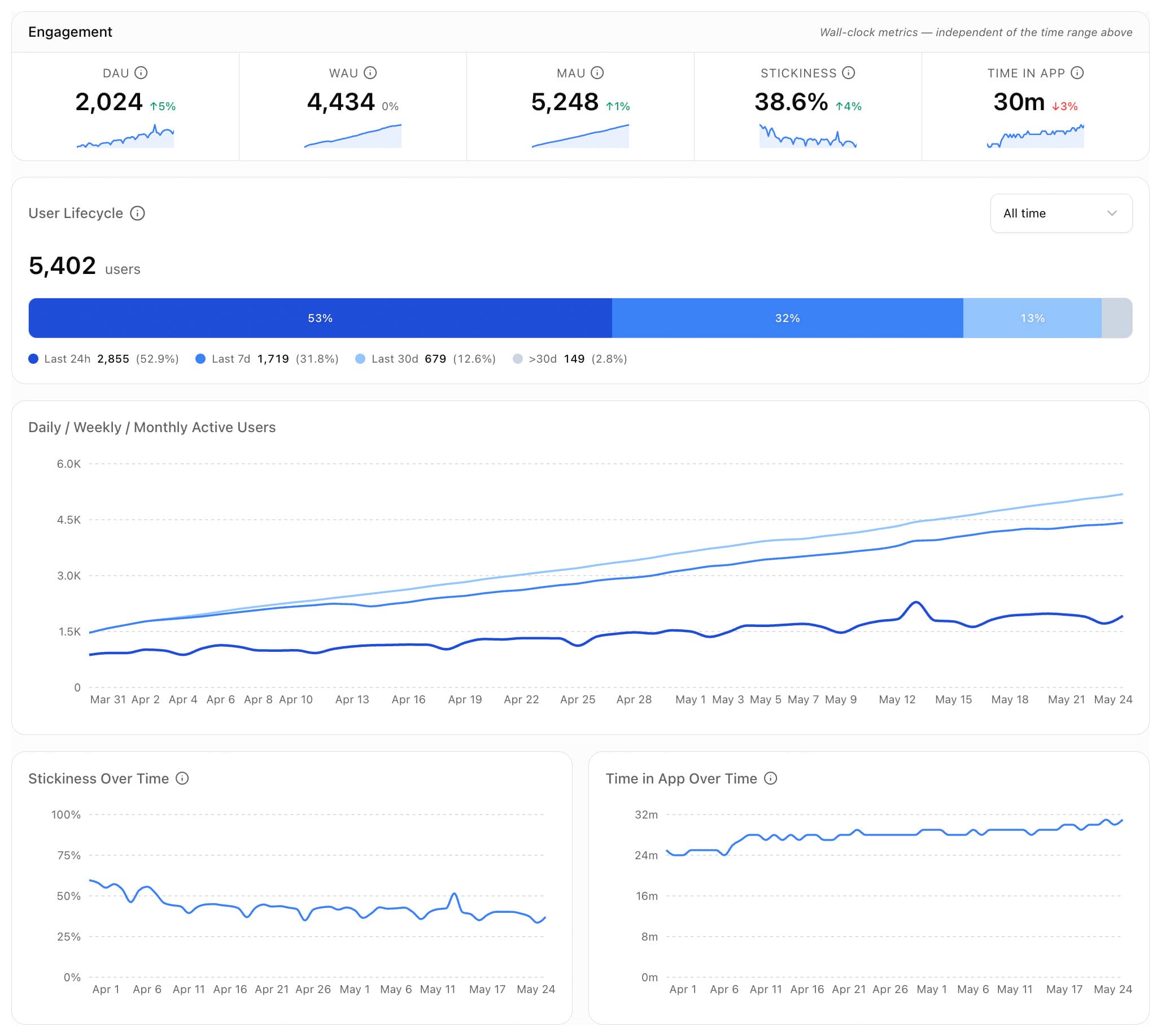
DAU / WAU / MAU
Active users over time
Stickiness
DAU ÷ MAU benchmarks
Time in App
Foreground minutes / DAU
Heatmap
When users are active
No events to wire up. No screens to tag.
Every other product analytics tool wants you to instrument screens, identify users, and define an event taxonomy before you see your first DAU number. Mobana ships a passive SDK heartbeat — call init() and your dashboard fills in.
- Automatic on init — the SDK sends a lightweight foreground heartbeat (every 5 min) the moment you call
Mobana.init(). - Privacy-first — no device IDs, no PII. Respects
setTrackingEnabled(false)for GDPR opt-out flows. - Free with every plan — heartbeats are not billed. Engagement analytics on every attributed (or organic) user, at no additional cost.
Mobana.init({ appId, appKey });How it works
Three steps — and the only one you actually do is the first.
Call Mobana.init()
Add the SDK and initialize it on app start. That's your entire integration.
Mobana.init({ appId: 'a1b2c3d4', appKey: 'your-app-key' });SDK sends heartbeats automatically
While the app is in the foreground, the SDK pings a lightweight /activity endpoint every 5 minutes. Server-side debouncing keeps the per-install write rate flat at ~12 / hour even under chatty conditions.
Watch the dashboard fill in
DAU / WAU / MAU, stickiness, time-in-app, activity heatmap, and lifecycle recency appear in real time. Filter by platform, country, and any UTM dimension to segment engagement by acquisition channel.
Every metric a PM actually checks
The core engagement surface today — with retention cohorts, churn, and LTV on the roadmap.
More engagement insights — coming soon
All powered by the same passive heartbeat your app already sends. No new instrumentation when these land.
Have a feature in mind? Tell us what you'd build next.
Simple, transparent pricing
Pay for what you use. Across all your apps. Nothing hidden.
- 2,500 attributions
- 5,000 flow views
- 250 AI credits
- Up to 3 apps
- 30 days data access
- 2 fixed conversions
- 5,000 attributions
- 10,000 flow views
- 500 AI credits
- Up to 5 apps
- 6 months data access
- Conversion tracking
- Engagement analytics
- 20,000 attributions
- 50,000 flow views
- 2,500 AI credits
- Unlimited apps
- 12 months data access
- Flows A/B testing
- Team access
- Priority support
- 100k+ attributions/mo
- 250k+ flow views/mo
- No limits
- On-premise option
- SLA guarantee
- Dedicated manager
An attribution is a confirmed install matched to a tracked click
A flow view is a session of a dynamic flow experience
AI requests are currently used for the Flows agentic AI Builder
Quick Start
Everything you need to integrate Mobana in minutes
View full documentationSDK Quick Start
Add the React Native SDK and configure it with your app ID from the Dashboard.
npm install @mobana/react-native-sdk @react-native-async-storage/async-storageimport { Mobana } from '@mobana/react-native-sdk';
// 1. Initialize once on app start.
// That's it — the SDK starts sending foreground heartbeats
// automatically. DAU, WAU, MAU, stickiness, time-in-app, and the
// activity heatmap appear in the dashboard with no further code.
Mobana.init({
appId: 'a1b2c3d4',
appKey: 'your-app-key',
});Direct API Reference
SDK heartbeat — engagement tracking
The SDK calls this endpoint automatically every 5 minutes while the app is in the foreground. You only need to call it directly for custom integrations on platforms without the React Native SDK. The SDK handles this automatically →
Request
POST https://a1b2c3d4.mobana.ai/activity
Content-Type: application/json
X-App-Key: your-app-key

{
  "installId": "520e8400c466a55440e00",
  "timestamp": 1706745600000
}
Response
{
  "success": true
}
Request Fields
| Field | Required | Description |
|---|---|---|
| installId | Required | Unique ID for this install (same ID used for /find and /conversion) |
| timestamp | Optional | Event time as epoch milliseconds. Defaults to server time. Future timestamps clamped for clock-skew safety. |
Free with every plan: Heartbeats are not billed. Engagement analytics (DAU/WAU/MAU, stickiness, time-in-app, heatmap) is included free on every plan.
Frequently asked questions
What counts as an “active user”?
A distinct install that emitted at least one foreground heartbeat in the relevant window — 24 hours for DAU, 7 days for WAU, 30 days for MAU. We don't require you to call an identify() method or log in users — active-user counts are keyed to the SDK install ID.
Do I really not have to instrument anything?
Correct. Once Mobana.init() runs, the SDK manages the foreground heartbeat lifecycle automatically — start on app foreground, stop on background, debounced server-side so you can't accidentally inflate counts. No screen hooks, no event names, no user identify calls required.
Is engagement analytics really free?
Yes. Heartbeats are not billed on any plan — Free Trial, Starter, Pro, or Scale. Your dashboard shows DAU/WAU/MAU/stickiness/time-in-app for every active install, attributed or organic, at no additional cost. The two metered surfaces remain attributions and flow views.
How does this differ from Conversion Tracking?
Conversion tracking is event-based — you call trackConversion('purchase', 49.99) at moments that matter to your business, and we attach revenue and feed those into funnel analysis. Engagement analytics is passive — the SDK reports app usage automatically so you can see DAU/MAU/stickiness without any code beyond init(). Most teams use both: conversions tell you what users do, engagement tells you whether they keep coming back.
What about GDPR and user opt-out?
The same opt-out switch as the rest of the SDK applies. Calling Mobana.setTrackingEnabled(false) (or passing enableTracking: false to init()) stops heartbeats from being sent. No device IDs or PII are collected in any case — engagement counts are keyed to the locally generated install ID.
How fresh is the data?
Heartbeats are written through within seconds of arriving. DAU, stickiness, and the heatmap reflect activity from the last few minutes — the same as the rest of the Mobana dashboard.
What's on the roadmap?
See the On the roadmap section above for the full list — retention cohorts, LTV by acquisition source, churn risk alerts, a custom cohort builder, and session analytics. All built on the same passive heartbeat, so no additional instrumentation will be required as new features land. g
What platforms are supported?
React Native (iOS and Android) today. Native iOS and Android SDKs are on the roadmap. Any platform can integrate by posting to the /activity endpoint directly — see the API reference for details.
Ready to see who keeps coming back?
Engagement analytics is included free with every plan. No instrumentation, no credit card.
Get Started Free